Lightweight Python Components
For Python developers, TangleML offers a special feature - lightweight component generation. It is supported by the Oasis CLI tool.
Learn more about the Oasis CLI tool in the Oasis CLI Manual section.
Lightweight Python components
Instead of the conventional approach where you write code, containerize it, publish to a registry, and manually create YAML configuration files, Oasis CLI tool automates this entire process. You simply write your Python code and run a single command - the system automatically generates the YAML specification running code as a command, eliminating the need to manage Docker images or registries.
This approach called "Lightweight Python components" and it dramatically reduces the time from code to component, allowing you to iterate faster and focus on the code logic rather than infrastructure.
implementation:
  container:
    image: python:3.9 # Use official image, no custom build!
    command: ["python", "-c"]
    args:
      - |
        def train_model(data_path: str, epochs: int = 10):
            # Your Python code here
            return model_path
        # Generated wrapper code handles I/O
Tutorial: Creating a lightweight Python component
This guide walks you through creating a TangleML component that performs regex-based text replacement. The component reads an input text file, replaces all substrings matching a given regex pattern, and writes the result to an output file.
To learn more about components in TangleML, check the component architecture page.
Step 1: Create the component function
You may use a quick start from the Oasis CLI Manual.
Create a file named regex_replace.py. The file should contain the following code:
from cloud_pipelines import components
from typing import Optional


def regex_replace(
    input_text_path: components.InputPath(),
    output_text_path: components.OutputPath(),
    pattern: str,
    replacement: str,
    flags: Optional[int] = 0,
    count: int = 0,
):
    # All imports must be inside the function for Cloud Pipelines compatibility
    import re

    # Read the input file
    with open(input_text_path, 'r') as input_file:
        content = input_file.read()

    # Perform regex replacement
    result = re.sub(
        pattern=pattern,
        repl=replacement,
        string=content,
        count=count,
        flags=flags
    )

    # Write the result to the output file
    with open(output_text_path, 'w') as output_file:
        output_file.write(result)
It is very usefull to add logging to your component.
    # Log operation details for debugging
    import logging
    logging.basicConfig(level=logging.INFO)
    logger = logging.getLogger(__name__)

    # Count matches for reporting
    matches = re.findall(pattern, content, flags=flags)
    num_matches = len(matches)

    logger.info(f"Regex pattern: {pattern}")
    logger.info(f"Replacement: {replacement}")
    logger.info(f"Total matches found: {num_matches}")
    logger.info(f"Replacements made: {min(num_matches if count == 0 else count, num_matches)}")
All imports, such as re and logging, are placed inside the function.
There are no external dependencies on code outside the function.
This design makes sure the function can be containerized properly.
The InputPath() annotation tells TangleML to provide a file path for your input data.
The OutputPath() annotation tells TangleML where your output data should be written.
These path annotations automatically handle data transfer between different pipeline components.
The function requires pattern and replacement parameters as strings.
It also includes optional parameters, like flags and count, which have default values.
Using proper type annotations helps generate the correct component interface.
There is one missing piece of information: the component name and description. Add the following metadata to the file immediately after the function definition:
def regex_replace(
    input_text_path: components.InputPath(),
    output_text_path: components.OutputPath(),
    pattern: str,
    replacement: str,
    flags: Optional[int] = 0,
    count: int = 0,
):
    """
    Replace substrings matching a regex pattern in a text file.

    Args:
        input_text_path: Path to the input text file
        output_text_path: Path where the output text file will be written
        pattern: Regular expression pattern to search for
        replacement: String to replace matched patterns with
        flags: Optional regex flags (e.g., re.IGNORECASE = 2, re.MULTILINE = 8)
        count: Maximum number of replacements per line (0 means replace all)
    """
This notation is used by the Oasis CLI tool to generate the proper component specification, including the component name and description, inputs and outputs inlined documentation.
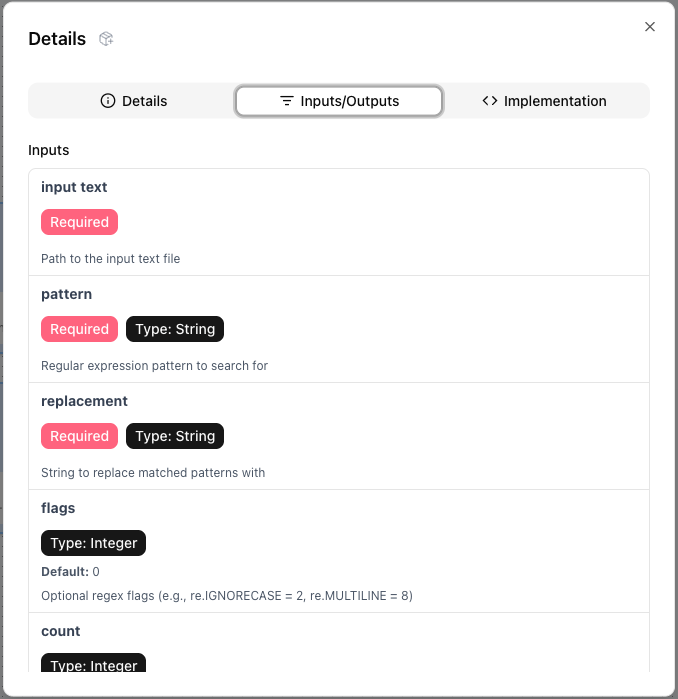
Step 2: Generate the component specification
Run the command:
PYTHONPATH=$PWD uvx --refresh --from git+https://github.com/Cloud-Pipelines/oasis-cli.git@stable \
      oasis components regenerate python-function-component \
      --output-component-yaml-path "regex_replace.component.yaml" \
      --module-path="regex_replace.py" \
      --function-name "regex_replace"
This generates regex_replace_component.yaml containing the component specification.
regex_replace_component.yaml
name: Regex replace
description: Replace substrings matching a regex pattern in a text file.
metadata:
  annotations:
    cloud_pipelines.net: "true"
    components new regenerate python-function-component: "true"
    python_original_code_path: regex_replace.py
    python_original_code: |
      """
      Cloud Pipelines compatible regex replace component function.
      This function reads text from a file, replaces substrings matching a regex pattern,
      and writes the result to an output file.
      """

      from typing import Optional
      from pipelines.components import InputPath, OutputPath


      def regex_replace(
          input_text_path: InputPath(),
          output_text_path: OutputPath(),
          pattern: str,
          replacement: str,
          flags: Optional[int] = 0,
          count: int = 0,
      ):
          """
          Replace substrings matching a regex pattern in a text file.

          Args:
              input_text_path: Path to the input text file
              output_text_path: Path where the output text file will be written
              pattern: Regular expression pattern to search for
              replacement: String to replace matched patterns with
              flags: Optional regex flags (e.g., re.IGNORECASE = 2, re.MULTILINE = 8)
              count: Maximum number of replacements per line (0 means replace all)
          """
          # All imports must be inside the function for Cloud Pipelines compatibility
          import re

          # Read the input file
          with open(input_text_path, "r") as input_file:
              content = input_file.read()

          # Perform regex replacement
          # The re.sub function replaces all occurrences of pattern with replacement
          result = re.sub(
              pattern=pattern, repl=replacement, string=content, count=count, flags=flags
          )

          # Write the result to the output file
          with open(output_text_path, "w") as output_file:
              output_file.write(result)

          # Log operation details for debugging
          import logging

          logging.basicConfig(level=logging.INFO)
          logger = logging.getLogger(__name__)

          # Count matches for reporting
          matches = re.findall(pattern, content, flags=flags)
          num_matches = len(matches)

          logger.info(f"Regex pattern: {pattern}")
          logger.info(f"Replacement: {replacement}")
          logger.info(f"Total matches found: {num_matches}")
          logger.info(
              f"Replacements made: {min(num_matches if count == 0 else count, num_matches)}"
          )
    component_yaml_path: regex_replace.component.yaml
inputs:
  - { name: input_text, description: Path to the input text file }
  - {
      name: pattern,
      type: String,
      description: Regular expression pattern to search
        for,
    }
  - {
      name: replacement,
      type: String,
      description: String to replace matched patterns
        with,
    }
  - {
      name: flags,
      type: Integer,
      description: "Optional regex flags (e.g., re.IGNORECASE
        = 2, re.MULTILINE = 8)",
      default: "0",
      optional: true,
    }
  - {
      name: count,
      type: Integer,
      description: Maximum number of replacements per line
        (0 means replace all),
      default: "0",
      optional: true,
    }
outputs:
  - {
      name: output_text,
      description: Path where the output text file will be written,
    }
implementation:
  container:
    image: python:3.11
    command:
      - sh
      - -ec
      - |
        program_path=$(mktemp)
        printf "%s" "$0" > "$program_path"
        python3 -u "$program_path" "$@"
      - |
        def _make_parent_dirs_and_return_path(file_path: str):
            import os

            os.makedirs(os.path.dirname(file_path), exist_ok=True)
            return file_path

        def regex_replace(
            input_text_path,
            output_text_path,
            pattern,
            replacement,
            flags = 0,
            count = 0,
        ):
            """
            Replace substrings matching a regex pattern in a text file.

            Args:
                input_text_path: Path to the input text file
                output_text_path: Path where the output text file will be written
                pattern: Regular expression pattern to search for
                replacement: String to replace matched patterns with
                flags: Optional regex flags (e.g., re.IGNORECASE = 2, re.MULTILINE = 8)
                count: Maximum number of replacements per line (0 means replace all)
            """
            # All imports must be inside the function for Cloud Pipelines compatibility
            import re

            # Read the input file
            with open(input_text_path, "r") as input_file:
                content = input_file.read()

            # Perform regex replacement
            # The re.sub function replaces all occurrences of pattern with replacement
            result = re.sub(
                pattern=pattern, repl=replacement, string=content, count=count, flags=flags
            )

            # Write the result to the output file
            with open(output_text_path, "w") as output_file:
                output_file.write(result)

            # Log operation details for debugging
            import logging

            logging.basicConfig(level=logging.INFO)
            logger = logging.getLogger(__name__)

            # Count matches for reporting
            matches = re.findall(pattern, content, flags=flags)
            num_matches = len(matches)

            logger.info(f"Regex pattern: {pattern}")
            logger.info(f"Replacement: {replacement}")
            logger.info(f"Total matches found: {num_matches}")
            logger.info(
                f"Replacements made: {min(num_matches if count == 0 else count, num_matches)}"
            )

        import argparse
        _parser = argparse.ArgumentParser(prog='Regex replace', description='Replace substrings matching a regex pattern in a text file.')
        _parser.add_argument("--input-text", dest="input_text_path", type=str, required=True, default=argparse.SUPPRESS)
        _parser.add_argument("--pattern", dest="pattern", type=str, required=True, default=argparse.SUPPRESS)
        _parser.add_argument("--replacement", dest="replacement", type=str, required=True, default=argparse.SUPPRESS)
        _parser.add_argument("--flags", dest="flags", type=int, required=False, default=argparse.SUPPRESS)
        _parser.add_argument("--count", dest="count", type=int, required=False, default=argparse.SUPPRESS)
        _parser.add_argument("--output-text", dest="output_text_path", type=_make_parent_dirs_and_return_path, required=True, default=argparse.SUPPRESS)
        _parsed_args = vars(_parser.parse_args())

        _outputs = regex_replace(**_parsed_args)
    args:
      - --input-text
      - { inputPath: input_text }
      - --pattern
      - { inputValue: pattern }
      - --replacement
      - { inputValue: replacement }
      - if:
          cond: { isPresent: flags }
          then:
            - --flags
            - { inputValue: flags }
      - if:
          cond: { isPresent: count }
          then:
            - --count
            - { inputValue: count }
      - --output-text
      - { outputPath: output_text }
Notice, that Oasis CLI tool generated additional code to handle component inputs and outputs. Do you still remember, that component in TangleML is just a CLI program?
  import argparse
  _parser = argparse.ArgumentParser(prog='Regex replace', description='Replace substrings matching a regex pattern in a text file.')
  _parser.add_argument("--input-text", dest="input_text_path", type=str, required=True, default=argparse.SUPPRESS)
  _parser.add_argument("--pattern", dest="pattern", type=str, required=True, default=argparse.SUPPRESS)
Step 3: Running the component
To use the component, drop it into your pipeline and configure the inputs. Click "Submit Run" to execute the pipeline.
Appendix
Sample Data
Employee Records - Confidential
================================

Employee: John Doe
Email: john.doe@company.com
Phone: (555) 123-4567
SSN: 123-45-6789
Department: Engineering

Employee: Jane Smith
Email: jane.smith@company.com
Phone: +1-555-987-6543
SSN: 987-65-4321
Department: Marketing

System Information:
Server IP: 192.168.1.100
Database IP: 10.0.0.45
Admin Email: admin@company.com

Payment Information:
Customer: Bob Wilson
Email: bob.wilson@email.com
Credit Card: 4532-1234-5678-9012
Billing Address: 123 Main St

Support Tickets:
Ticket #1234
From: customer1@gmail.com
Issue: Cannot access account from IP 203.0.113.42

Ticket #5678
From: support@website.org
Issue: Payment failed for card ending in 4321

Notes:
- Contact HR at hr@company.com or call 555-0100
- Server maintenance scheduled for 192.168.1.200
- Update payment info for CC: 5432 1098 7654 3210
Common Regex Patterns
| Use Case | Pattern | Example Replacement |
|---|---|---|
| Email Addresses | \b[A-Za-z0-9._%+-]+@[A-Za-z0-9.-]+\.[A-Z|a-z]{2,}\b | [EMAIL] |
| Phone Numbers | \b\d{3}[-.]?\d{3}[-.]?\d{4}\b | [PHONE] |
| URLs | https?://[^\s]+ | [URL] |
| IP Addresses | \b(?:[0-9]{1,3}\.){3}[0-9]{1,3}\b | [IP] |
| Dates (MM/DD/YYYY) | \b\d{1,2}/\d{1,2}/\d{4}\b | [DATE] |
| Credit Cards | \b\d{4}[\s-]?\d{4}[\s-]?\d{4}[\s-]?\d{4}\b | [CC] |
| Social Security Numbers | \b\d{3}-\d{2}-\d{4}\b | [SSN] |
| Whitespace Cleanup | \s+ | |
| HTML Tags | <[^>]+> | |
| Code Comments (Python) | #.*$ | |
Regex Flags Reference
| Flag | Value | Description | Use Case |
|---|---|---|---|
re.IGNORECASE | 2 | Case-insensitive matching | Match "Error", "ERROR", "error" |
re.MULTILINE | 8 | ^ and $ match line boundaries | Pattern matching per line |
re.DOTALL | 16 | . matches newlines | Multi-line pattern matching |
re.VERBOSE | 64 | Ignore whitespace in pattern | Complex patterns with comments |
To combine flags, add their values:
flags = 2 + 8 # IGNORECASE + MULTILINE = 10
Afterthoughts
The InputPath and OutputPath annotations
The text_path: InputPath() annotation tells the system that the input data for the text input should be placed into some file and the path of that file should be given to the function as a value for the text_path function parameter.
The filtered_text_path: OutputPath() annotation tells the system that it should generate and give the function a path (via the filtered_text_path parameter) where the function should write the output data. After the function finishes the execution, the system will take the output data written by the function, put it into storage and make it available for passing to other components.
Why do we need the InputPath parameter annotation?
Not all data can be passed/received as a simple string. Examples: binary data, large data, directories. In all these cases, the code should read data from a file or directory pointed to by a path. This is why we have a text_path: InputPath() parameter and not text: str parameter (although the latter could still work for short texts). Another reason why the InputPath annotation is needed is that the component function code is executed inside a hermetic container. The text file needs to somehow be placed inside the container. Only the system can do that. The text_path: InputPath() annotation tells the system that the input data for the text input should be placed into some file and the path of that file should be given to the function as a value for the text_path function parameter.
Similarly the filtered_text_path: OutputPath() parameter annotation is needed so that the system knows that it needs to get the output data out of the container when the function finishes its execution.
Default parameter values
The create_component_from_func function supports functions with default parameter values. This results in the generated component inputs becoming optional.
Path parameters annotated with InputPath() can have a default value of None which makes those file inputs optional.
The default parameter values can use any Python built-in type. (Only the built-in types can be used because the function needs to remain self-contained).
def some_func(
    some_int: int = 3,
    some_path: InputPath() = None,
):
    from pathlib import Path
    if some_path:
        Path(some_path).read_text()
    ...
Input and Output types
While low-level TangleML does not enforce any types, the Oasis CLI generator (components.create_component_from_func) provides support for six basic Python types:
| Python Type | TangleML Type | Serialization |
|---|---|---|
str | String | Direct passing |
int | Integer | String to int conversion |
float | Float | String to float conversion |
bool | Boolean | String to boolean conversion |
list | JsonArray | JSON serialization |
dict | JsonObject | JSON serialization |
Beyond the Basics: You can use any type annotation (like XGBoostModel), but unsupported types will be passed as strings. The generator only adds serialization/deserialization for the six basic types.
The function parameters (the parameter names and type annotations) are mapped to component inputs and outputs in a certain way. This example demonstrates all aspects of the mapping
def my_func(
    # Directly supported types:
    # Mapped to input with name "some_string" and type "String"
    some_string: str,
    # Mapped to input with name "some_string" and type "Integer"
    some_integer: int,
    # Mapped to input with name "some_float" and type "Float"
    some_float: float,
    # Mapped to input with name "some_boolean" and type "Boolean"
    some_boolean: bool,
    # Mapped to input with name "some_list" and type "JsonArray"
    some_list: list,
    # Mapped to input with name "some_dict" and type "JsonObject"
    some_dict: dict,

    # Mapped to input with name "any_thing" and no type (compatible with any type. Will receive a string value at runtime!)
    any_thing,

    # Other types
    # Mapped to input with name "some_uri" and type "Uri" (Will receive a string value at runtime!)
    some_uri: "Uri",
    # Mapped to input with name "some_uri" and type "BigInt" (Will receive a string value at runtime!)
    some_uri: BigInt,

    # Paths:
    # Mapped to input with name "input1" (the "_path" suffix is removed)
    input1_path: InputPath(""),
    # Mapped to output with name "output1" and type "CSV" (the "_path" suffix is removed)
    output1_path: OutputPath("CSV"),
) -> typing.NamedTuple("Outputs", [
    # Mapped to output with name "output_string" and type "String"
    ("output_string", str),
    # Mapped to output with name "output_uri" and type "Uri" (function needs to return a string)
    ("output_uri", "Uri"),
]):
    ...
    return ("Some string", "some-uri://...")