Understanding Artifacts in TangleML
Artifacts are the data produced by components (read: any output), stored in TangleML's artifact storage system:
- Blobs: Nameless files (just data)
- Directories: Nameless containers with named files inside
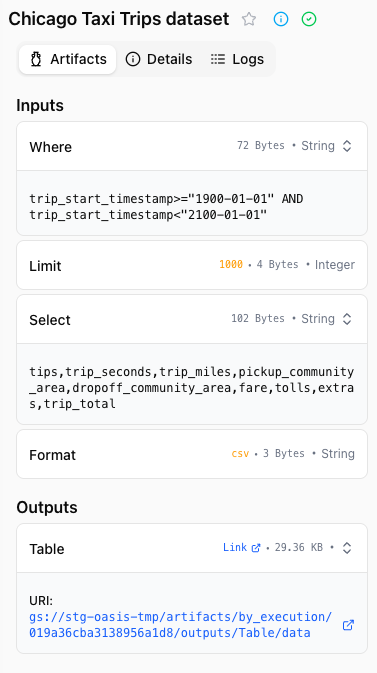
Artifacts can be accessed in the Pipeline Run page, in the Artifacts tab.
Small values may be stored in the TangleML database without putting any TTL on them.
Blob vs directory artifacts
Blob artifacts
Blobs are nameless data files. Components always write to and read from a file named data:
# Component writes blob
with open("/tmp/outputs/model/data", "wb") as f:
    pickle.dump(model, f)

# Downstream component reads blob
with open("/tmp/inputs/model/data", "rb") as f:
    model = pickle.load(f)
This naming convention ensures compatibility - no component expects specific filenames.
Directory artifacts
Directories are nameless containers, but files inside retain their names:
# component writes directory
output_dir = "/tmp/outputs/dataset/data/"
os.makedirs(output_dir, exist_ok=True)
pd.DataFrame(...).to_parquet(f"{output_dir}/train.parquet")
pd.DataFrame(...).to_parquet(f"{output_dir}/test.parquet")

# Downstream component reads directory
input_dir = "/tmp/inputs/dataset/data/"
train = pd.read_parquet(f"{input_dir}/train.parquet")
test = pd.read_parquet(f"{input_dir}/test.parquet")
Artifact attributes
Every artifact has:
- Size: Total bytes (for directories, cumulative size)
- Hash: MD5 (Google Cloud) or SHA-256 (local) for content-based caching
- Is Directory: Boolean flag
- URL: Storage location (hidden from components, managed by system)
Storage and retention
| Artifact Type | Storage Duration | What's Retained After TTL |
|---|---|---|
| Large artifacts | 30 days (Shopify) | Metadata only (size, hash) |
| Small values | Permanent | Full value in database |
The retention period for large artifacts is configured per deployment. When a retention period is configured, the run view displays an Artifact Storage warning at the top of the artifact section reminding you that artifacts older than the retention period may no longer be available in remote storage. The notice includes the configured number of days. If your deployment does not configure a retention period, this notice is suppressed.
When artifacts are no longer available
Artifacts may become unavailable after their retention period has elapsed, or because of a transient storage error. When the inline viewer cannot load an artifact, an inline notice replaces the preview:
- Artifact unavailable — the artifact could not be found in storage (HTTP 404). When a retention period is configured, the notice mentions that the artifact may have expired and includes the retention window.
- Too large to preview — the artifact exceeds the 50 MB inline preview limit. Parquet artifacts are exempt from this limit (see Parquet artifacts below).
- Failed to load artifact — an unexpected error occurred while fetching the artifact. The HTTP status code and message are included to help diagnose the issue.
Artifact metadata such as size and hash remains visible even when the underlying data is no longer available.
Inline artifact viewer
The run view includes an inline artifact viewer that renders artifact contents directly in the browser. The viewer activates automatically based on the artifact's content type:
| Format | Display |
|---|---|
| Text / plain text | Syntax-highlighted code viewer |
| JSON | Collapsible tree view for objects and arrays |
| CSV / TSV | Scrollable table with column headers |
| Apache Parquet | Scrollable table, read in pages directly from storage |
| Images (PNG, JPEG, GIF, WebP, etc.) | Displayed inline |
| URL | The link itself, followable and copyable — see URL artifacts |
The viewer picks a renderer from the artifact's declared type, and falls back to the file extension of the artifact's location when no type is declared. Common aliases are understood, so txt, log, yaml, yml, and xml render as text; uri and link as a URL; png, jpg, svg, and the other image extensions as images; json as JSON; and parquet or table as Parquet.
Click the fullscreen button to expand the viewer to fill the screen. For artifact types that cannot be rendered inline, a download link is shown instead.
URL artifacts
A component whose output is a location rather than data — a deployed endpoint, a dashboard, a file in another system — can declare it as a URL artifact. The viewer renders it as the link itself, in a monospace font, alongside a Copy URL button that copies it to the clipboard. Following the link opens it in a new tab.
Only absolute http and https URLs are treated as links. A value that is not a usable URL is shown verbatim under a Not a valid URL note, so you can still see what the component actually wrote, and an empty value reads as No data.
Tabular viewer (CSV, TSV, Parquet)
Tabular artifacts share a common viewer with paging, sticky headers, and a download escape hatch.
The header reports the artifact's exact total row and column counts — for example 1,250,000 rows · 32 columns. These counts describe the whole artifact, not the loaded preview: Parquet reads them from the file's metadata, and CSV/TSV counts every row with a streaming parse while retaining only the preview rows in memory.
- Initial load: the first 100 rows are rendered. The footer shows "Showing first 100 of 1,250,000 rows", or "Showing all N rows" when the entire artifact fits within the preview limit.
- Load more: click Load more to append another 100 rows.
- Load max: click Load max to jump straight to the preview limit without paging through it.
- Sticky column headers: headers remain visible while you scroll the table vertically. The table also scrolls horizontally when columns overflow the viewport.
- Column types: when the artifact's schema is available (such as for Parquet files), each column header shows the column type below the name. Nullable columns are marked with a trailing
?(for exampleint64?). - Structured cells: a cell holding a nested object or array — common in Parquet — is rendered as compact JSON (for example
{"locale":"en","limit":3}) rather than as a placeholder, and the full value is available in the cell's tooltip.
Preview limit
The preview table renders every cell into the page, so its cost scales with rows × columns rather than rows alone. The viewer is therefore bounded by a 50,000-cell budget instead of a fixed row count: the row limit is floor(50,000 / column count), with an absolute backstop of 10,000 rows so that a very narrow table still cannot flood the page. Rows are atomic — the budget is floored to whole rows, so partial rows are never shown.
| Columns | Preview row limit |
|---|---|
| ≤ 5 | 10,000 (backstop) |
| 10 | 5,000 |
| 20 | 2,500 |
| 100 | 500 |
The same limit applies to Parquet and to CSV/TSV.
Downloading the full dataset
When the preview limit is reached and the artifact still holds more rows than are displayed, the footer shows "Preview limit reached" next to a Download full dataset link. Use it when you need the complete data rather than a preview — remote artifacts are fetched from their signed URL and saved locally, and inline CSV/TSV values are saved directly.
Parquet artifacts
Parquet previews read the file in pages using range requests rather than downloading it up front. The viewer pulls the file's metadata plus the first rows, and each Load more or Load max fetches only the range it still needs — rows already loaded are never re-read, and the whole file is never downloaded.
This has a few consequences worth knowing:
- Large Parquet files open quickly, at any size. Because the viewer never downloads the whole file, Parquet previews are not subject to the 50 MB inline preview limit that applies to other artifact types. To read a file in pages the viewer first needs its total size: it uses the size already recorded against the artifact where that is known, and otherwise asks storage for the file's first byte and takes the total from the response. Only where neither is available does it fall back to downloading the whole file, which is subject to the 50 MB limit and reports This parquet file is too large to preview above it.
- Row and column counts are exact from the start, because they come from the file's metadata rather than from the rows that have loaded so far.
- Download schema: a Download schema button in the viewer header saves the file's column layout — names, types, and nullability — as a
schema.jsonfile.
Use the standalone artifact preview page (below) when you need to share a view of an artifact or browse it on its own dedicated page — the tabular viewer there behaves the same way but uses the full window height.
Standalone artifact preview page
Every artifact has a dedicated, shareable preview page at /artifact/<artifact-id>. The page renders the same inline viewer as the run view but fills the browser window, which is useful for inspecting large tables or sharing a specific artifact with a collaborator.
There are two ways to open the page from the run view:
- Cmd/Ctrl + click the fullscreen button in the artifact visualizer dialog. The standalone page opens in a new browser tab.
- Click the Share button in the artifact visualizer header. The full preview URL is copied to your clipboard and a "Link copied to clipboard" toast confirms the copy. Paste the link to share it with another user, or open it later.
The preview URL accepts optional type and name query parameters so the page can pick the right viewer and display label without round-tripping to the run view. Anyone with access to the same TangleML backend can open the link; if the artifact has aged out of remote storage, the page shows the same Artifact unavailable notice described above.