Running Tangle on Hugging Face
This guide covers deploying and running TangleML on Hugging Face Spaces, from accessing the public playground to setting up your own team instance.
Accessing Tangle on Hugging Face
There are two primary ways to access the Tangle application on Hugging Face:
On the Hugging Face website
Navigate to the TangleML organization on Hugging Face at huggingface.co/spaces/tangleml/tangle. Here you'll find a Tangle space in an embedded iframe where you can click to start using the application.
Embedded iframe
There's also an embedded version at tangleml-tangle.hf.space. This version allows you to share run URLs, and maximizes vertical screen real estate.
Here's an example of embedding the iframe:
<iframe
	src="https://tangleml-tangle.hf.space"
	frameborder="0"
	width="850"
	height="450"
></iframe>
Multi-tenant architecture
The main Tangle instance on Hugging Face operates as a multi-tenant system, where:
- Each user works in complete isolation
- Every user has their own database for runs, components, and metadata
- Each user has separate data artifact storage
- Users cannot see or access other users' work
Data privacy and storage
When using the multi-tenant Tangle:
- Output artifacts are stored in your personal Hugging Face dataset repository (at
your-username/tangle-data) - These repositories are private by default
- You maintain full ownership of your artifacts
- You can optionally make your data public through repository settings
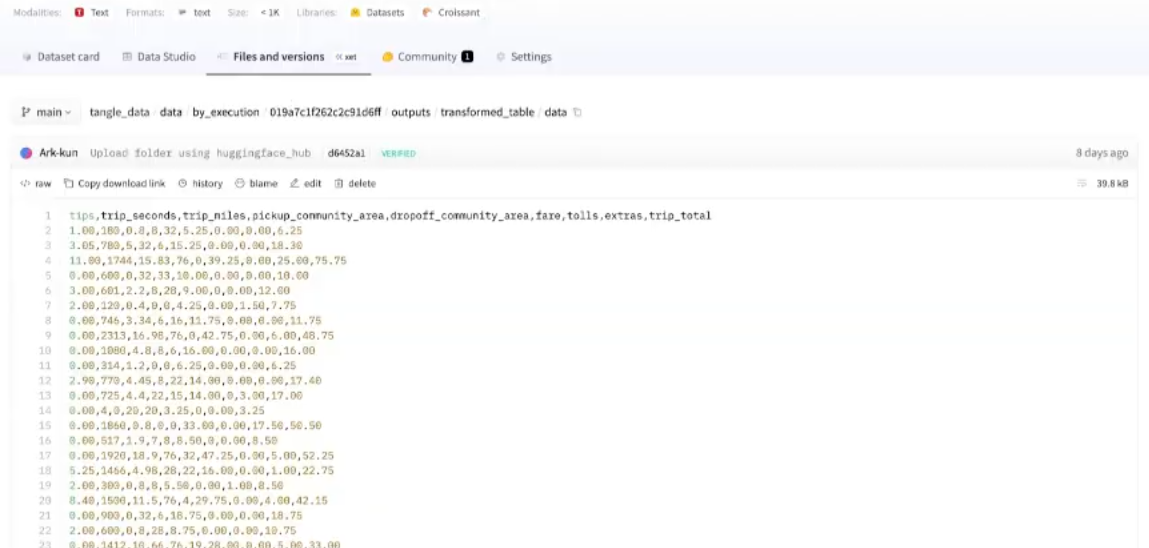
The run database containing metadata is currently stored in Tangle's persistent storage, not in your personal repository. This may change in future updates.
Where executions run
Pipeline executions run as Hugging Face jobs in your own account:
- Jobs run under your username, not under tangleml/tangle
- You can view and monitor job execution directly in Hugging Face
- Each execution links to its corresponding Hugging Face job
Requirements and costs
What you need
To use the shared Tangle instance on Hugging Face:
- Hugging Face account: Create and log in to your account
- Permissions: Grant Tangle access to:
- Create repositories
- Write to repositories
- Create jobs
- Hugging Face Pro subscription: Required for job execution
Cost breakdown
Free to try: You can explore the interface and create pipelines without a subscription. You only need Pro status to actually run jobs.
- Pro Subscription: $9/month (required for job execution)
- CPU Jobs: Very affordable, almost negligible cost
- GPU Jobs: More expensive, depending on hardware and duration
- Storage: Your artifacts use your Hugging Face storage quota
Creating your own Tangle instance
Teams or individuals who want their own dedicated Tangle instance can duplicate the space.
How to duplicate
- Navigate to the tangleml/tangle space
- Click the three-dots menu
- Select Duplicate Space
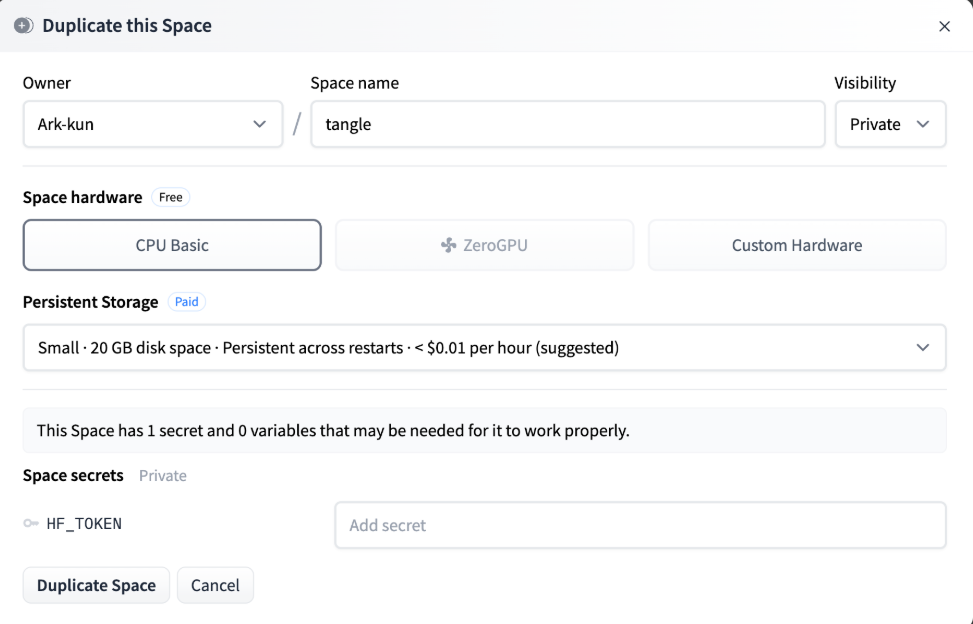
Configuration options
When duplicating, you'll need to configure:
| Setting | Instructions |
|---|---|
| Owner | Choose your user account or organization |
| Space name | Name your Tangle instance |
| Visibility |
|
| Hardware |
|
| Persistent Storage |
|
| Hugging Face Token | Create a token with permissions for:
|
Single-tenant vs multi-tenant differences
Your duplicated space operates differently from the shared instance:
Authentication
- Uses the configured token instead of individual user tokens
- Allows fine-grained permission control
- Can access private repositories if token has permissions
Multi-user support
- Multiple team members can use the same instance
- Initiated by field shows different users
- All users share the same runs database
Permissions model
User permissions in your Tangle instance mirror their organization roles:
- Read-only org members → Read-only in Tangle
- Write access → Can submit runs
- Admin → Full Tangle admin capabilities
If you duplicate to a personal account (not an organization), you'll automatically be the admin of your instance.
Data storage
- Artifacts stored in
your-space-name_datarepository - All team members share the same artifact storage
- Database remains in the space's persistent storage
Subscription requirements by setup
Individual users
- Shared Instance: Pro subscription
- Personal Instance: Pro subscription + storage costs
Teams and organizations
- Organization Instance: Team subscription
- Required for: Running jobs in organization namespace
- Includes: Collaboration features and shared resources
Limitations on Hugging Face
Storage constraints
The primary limitation is data storage:
- Only dataset repositories available for artifact storage
- No direct mounting of storage (unlike Kubernetes deployments)
- All data must be committed via Git operations
- Input/output requires explicit download/upload steps
This adds overhead to pipeline execution as data must be downloaded before processing and uploaded after completion.
Container compatibility
Some technical requirements for containers:
- Must support Python installation (for Hugging Face CLI)
- Requires compatibility with uv package manager
- Issues with very old Alpine images (4-5 years old)
- Problems with musl-based containers vs glibc
Most modern containers work without issues. Problems typically only occur with outdated or specialized minimal containers.
Component considerations
When creating Components for Hugging Face deployment:
Data import/export:
- Use Hugging Face-specific upload/download components
- Standard library components being developed for HF repositories
- Web downloads work universally
Cross-cloud operations:
- Authentication challenges when accessing other clouds (GCS, AWS)
- Requires credential management through private HF repositories
- Private repos can act as secret managers for credentials
Cloud-specific services:
- BigQuery, Vertex AI, etc. require special authentication
- Consider using Hugging Face native services (inference, serving)
- Plan for credential distribution in multi-cloud scenarios
Public space access
Making your duplicated space public enables:
- Read-only access for non-authenticated users
- Public viewing of runs and logs
- Future: artifact previews and visualizations
- Shareable URLs for demonstrations
Keep your space private if you're working with sensitive data. Public spaces allow anyone to view your pipeline runs.
Best practices
For individuals
- Start with the shared multi-tenant instance
- Upgrade to Pro only when ready to run jobs
- Monitor job costs, especially for GPU workloads
For teams
- Duplicate to your organization namespace
- Configure appropriate persistent storage
- Set up team permissions before inviting members
- Consider data privacy requirements
For component development
- Test containers for Python/HF CLI compatibility
- Plan data flow considering HF repository constraints
- Handle credentials securely for cross-cloud operations
- Leverage Hugging Face native services where possible